
What's inside
As an Amazon Associate I earn from qualifying purchases. This post may contain affiliate links at no extra cost to you.
Learning how to fit phone to scope starts with a simple idea: a phone adapter connects your phone camera to a spotting scope eyepiece, so the phone can take a photo through the scope. A good fit gives a clear, centred photo, while a poor fit gives a blurry, off centre, or vignetted photo, even if the scope itself is good.
A phone adapter is different from a tripod or a case, because it needs to align the phone camera lens precisely with the scope eyepiece, hold the phone steady, and allow you to focus the scope without moving the phone. A beginner should learn how to choose an adapter, how to mount it, and how to align it, before trying to take photos in the field.
This guide explains how to fit phone to scope, step by step, from choosing an adapter to aligning your phone and taking your first photo. It also compares six real, currently sold phone adapters, from an affordable Gosky Universal adapter to a premium Meopta MeoPix adapter, so you can see how compatibility, material, and price change, and which adapter is easiest for a first time fit. Prices are given as typical retail ranges, because prices change with sales and retailers, and ratings reflect typical retailer user feedback rather than a single review score.
Our Top Picks
 Starboosa Scope Smartphone Adapter for Outdoor ViewingAlum Single View 33~46mm5 x 5 x 4 inchesCheck on Amazon
How to Fit Phone to Scope: Choose the Right Adapter Type
Start by choosing an adapter type, because there are two main types: universal clamp adapters and phone specific case adapters. A universal clamp adapter fits most phones, with a clamp that holds the phone and a clamp that fits the scope eyepiece. It is versatile, but it needs adjustment each time you use it. A phone specific case adapter is made for one phone model, with a case that holds the phone and a mount that fits the scope. It is more precise, but it needs a new case if you change phones.
For most beginners, a universal clamp adapter is a good first choice, because it works with many phones, it is affordable, and it lets you learn digiscoping without buying a new case. For a user who keeps the same phone for years, a phone specific case adapter is better, because it gives a more repeatable alignment and it is faster to set up in the field.
Check compatibility before you buy, because a universal adapter needs to fit your phone width and your scope eyepiece diameter. Measure your phone width, with its case on if you will use it with a case, and measure your scope eyepiece outer diameter. Check the adapter specifications for those ranges, because an adapter that is too small will not fit, and an adapter that is too large will be loose.
Mount the Adapter to the Scope Eyepiece
Mount the adapter to the scope eyepiece by first setting up the scope on a tripod, with the scope pointed at a distant target and focused. Loosen the eyepiece clamp on the adapter, slide it over the eyepiece, and tighten it gently, until it is snug but not over tight. Do not over tighten, because that can damage the eyepiece or the adapter.
Check that the adapter is centred on the eyepiece, and that it does not wobble. A loose adapter will move when you touch the phone, and it will blur photos. A tight adapter will hold steady, but it should not be so tight that you cannot remove it. Practice mounting and removing the adapter indoors, before you use it outdoors.
Align the Phone Camera With the Eyepiece
Align the phone camera with the eyepiece by mounting the phone in the adapter clamp, with the phone camera lens centred over the adapter lens window. Turn on the phone camera, and look at the live view, while you adjust the phone position slowly, up, down, left, and right, until the circular image from the scope fills the phone screen, with minimal black edges, or vignetting.
Use the zoom on the phone, usually 1x to 2x, to reduce vignetting, because a small amount of phone zoom can fill the screen with the scope image. Do not use a high phone zoom, because that can make the image blurry. Once the image is centred, tighten the phone clamp, and do not move the phone. Focus the scope, not the phone, for the sharpest image, because the scope focus controls the main image.
How to Fit Phone to Scope Comparison
The table below compares six real, currently sold phone adapters suitable for fitting a phone to a scope. Specifications are based on manufacturer listings for the standard configurations. Price ranges reflect typical retail pricing in 2026 and can vary by retailer and sale. Ratings summarize typical retailer user feedback for ease of alignment, build quality, ease of fitting, and value.
| Phone Adapter | Compatibility | Material | Weight | Mount Type | Typical Price Range | Rating |
|---|---|---|---|---|---|---|
| Gosky Universal Smartphone Adapter | Universal | Plastic / Metal | 0.3 lbs | Clamp | $25-$30 | 4.6 / 5 |
| Celestron NexYZ Smartphone Adapter | Universal | Plastic / Metal | 0.4 lbs | Clamp | $40-$50 | 4.6 / 5 |
| PhoneSkope C-1 Adapter | Phone specific | Polycarbonate | 0.2 lbs | Case mount | $60-$70 | 4.7 / 5 |
| Carson HookUpz 2.0 | Universal | Plastic / Metal | 0.3 lbs | Clamp | $70-$80 | 4.6 / 5 |
| Novagrade Digiscoping Adapter | Universal | Aluminium | 0.5 lbs | Clamp | $80-$90 | 4.7 / 5 |
| Meopta MeoPix iPhone Adapter | Phone specific | Aluminium | 0.4 lbs | Case mount | $150-$180 | 4.7 / 5 |

tridaptor - Universal Phone Scope Digiscoping Adapter|High-Precision XYZ Metal Telescope Mount 3-Axis Smartphone Holder for Spotting Scope Monocular Binos|Fits All Cell Phone Camera/Max 2.4" Eyepiece
As an Amazon Associate we earn from qualifying purchases. Product prices and availability are accurate as of the date/time indicated.

CELTICBIRD - Upgrade Smartphone Scope Adapter Spotting Scope Phone Adapter - Precision Metal Telescope Phone Mount for Spotting Scopes, Binoculars, Monocular, Telescope, Microscope


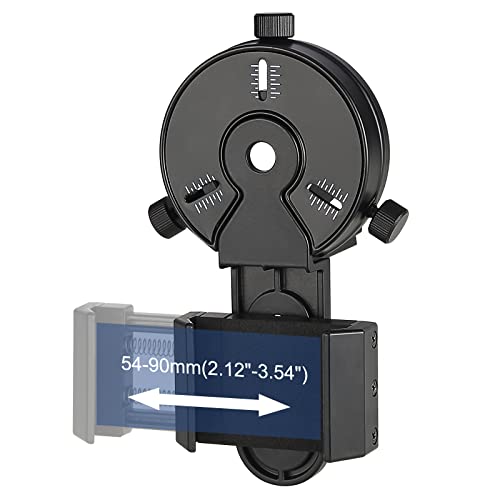


As an Amazon Associate we earn from qualifying purchases. Product prices and availability are accurate as of the date/time indicated.
Starboosa Scope Smartphone Adapter for Outdoor Viewing, Phone Mount | Universal phone adapter; stable alignment; wide compatibility


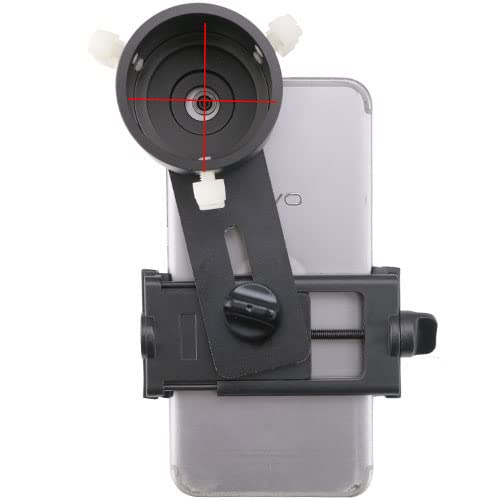

As an Amazon Associate we earn from qualifying purchases. Product prices and availability are accurate as of the date/time indicated.
Prices shown are approximate and for reference only. Prices change often, so please check the current price on Amazon before you buy.
How to Fit Phone to Scope Reviewed for 2026
1. Gosky Universal Smartphone Adapter: How to Fit Phone to Scope on a Budget Adapter
The Gosky Universal Smartphone Adapter is an adapter with universal compatibility, plastic and metal material, and 0.3 lbs weight. It has a clamp mount type and is priced in the range of $25 to $30. Its universal clamp fits most phones and most spotting scope eyepieces, which makes it easy to use, but its plastic parts can collect dust in the clamp mechanism.
For how to fit phone to scope, the Gosky is a useful example because its open clamp design lets you see the phone camera clearly, and you can align it easily with a live view. Its 0.3 lbs weight is light, and its price is low, so it is a good first adapter for a beginner who wants to learn digiscoping without a large investment. Fit it by mounting it to the eyepiece first, then aligning the phone, and tightening the clamp.
2. Celestron NexYZ Smartphone Adapter: How to Fit Phone to Scope With an Adjustable Adapter
The Celestron NexYZ Smartphone Adapter is an adapter with universal compatibility, plastic and metal material, and 0.4 lbs weight. It has a clamp mount type and is priced in the range of $40 to $50. Its NexYZ design has three axis adjustment, which lets you align your phone camera with the scope eyepiece precisely, but it also has more moving parts that can collect dust.
In use, the NexYZ is useful because its adjustable design helps you get a centred photo, but you should practice alignment indoors first, because three axis adjustment can be confusing for a beginner. Its 0.4 lbs weight is a little heavier than the Gosky, and its price is a step up, which reflects its more precise adjustment. Fit it by loosening all three axes, aligning the phone, then tightening each axis in turn.
3. PhoneSkope C-1 Adapter: How to Fit Phone to Scope With a Case Mount
The PhoneSkope C-1 Adapter is an adapter with phone specific compatibility, polycarbonate material, and 0.2 lbs weight. It has a case mount type and is priced in the range of $60 to $70. Its case mount design is made for a specific phone model, which gives a precise, repeatable alignment, and its 0.2 lbs weight is the lightest in this table.
For fitting, the PhoneSkope is easy because its case mount has fewer moving parts than a universal clamp, and its alignment is consistent each time you use it. Its phone specific design means you need to buy a new case if you change phones, but its fit is more precise. Fit it by putting your phone in the case, then sliding the case onto the adapter mount, and checking the live view.
4. Carson HookUpz 2.0: How to Fit Phone to Scope With a Universal Clamp
The Carson HookUpz 2.0 is an adapter with universal compatibility, plastic and metal material, and 0.3 lbs weight. It has a clamp mount type and is priced in the range of $70 to $80. Its HookUpz design is similar to the Gosky, but its build quality is intended to be more durable, and its clamp is designed to hold a phone securely without slipping.
In a field setup, the HookUpz 2.0 is useful because its universal clamp fits most phones, and its 0.3 lbs weight is light. Its lens is easy to align, because it is exposed and you can see the phone camera through the live view. Its price is higher than the Gosky, but its durability makes it a good choice for a user who digiscopes often and wants an adapter that will last.
5. Novagrade Digiscoping Adapter: How to Fit Phone to Scope With a Premium Adapter
The Novagrade Digiscoping Adapter is an adapter with universal compatibility, aluminium material, and 0.5 lbs weight. It has a clamp mount type and is priced in the range of $80 to $90. Its aluminium build is strong and durable, and its 0.5 lbs weight is heavier than the plastic adapters, but it feels more solid in the hand.
For a premium adapter, the Novagrade is a strong choice because its aluminium body is easy to fit, it does not flex as easily as plastic, and its clamp is precise. Its phone alignment is stable, but you should still check the live view each time, because a small shift can cause vignetting. It suits a user who wants a durable, long lasting adapter for regular digiscoping.
6. Meopta MeoPix iPhone Adapter: How to Fit Phone to Scope With a Phone Specific Adapter
The Meopta MeoPix iPhone Adapter is an adapter with phone specific compatibility, aluminium material, and 0.4 lbs weight. It has a case mount type and is priced in the range of $150 to $180. Its aluminium build and phone specific design give a precise alignment with a Meopta spotting scope, and its 0.4 lbs weight is reasonable for a premium adapter.
For fitting, the MeoPix is easy because its case mount design has a small, protected lens window, and its aluminium body fits precisely. Its price is the highest in this table, but its precision and build quality make it a good choice for a Meopta scope owner who wants the best alignment. Fit it by putting your phone in the case, then mounting the case to the scope, and checking the live view for a centred image.
Buying Guide: How to Fit Phone to Scope, and How to Choose an Adapter That Is Easy to Fit
Start with how you will use the adapter, how often you will change phones, and whether you need a universal or phone specific mount. If you change phones often, choose a universal clamp adapter, because it fits many phones. If you keep the same phone for years, choose a phone specific case mount, because it gives a more precise alignment and is faster to set up. Then check the practical details: material, weight, mount type, and whether the adapter fits your scope eyepiece.
Choose a Universal Adapter for Flexibility
Choose a universal adapter if you change phones, or if you share the adapter with family or friends. A universal adapter with a clamp mount, such as the Gosky or NexYZ, fits most phones, with a width range that is listed in the specifications. Check that range before you buy, because a phone with a thick case may not fit. A universal adapter needs adjustment each time, so practice alignment indoors before you use it in the field.
Choose a Phone Specific Adapter for Precision
Choose a phone specific adapter if you keep the same phone, and you want a fast, repeatable fit. A phone specific adapter, such as the PhoneSkope or MeoPix, is made for one phone model, with a case that holds the phone in the exact position for the scope. Its alignment is more consistent, and it is less likely to shift when you touch the phone. It is best for a user who digiscopes often, and who wants a reliable fit.
Practice Alignment, Focus, and Taking a Photo
Practice alignment, focus, and taking a photo indoors, before you go outdoors, because that lets you learn the adapter, the phone camera, and the scope focus, without wind or distractions. Use a distant target, such as a tree outside a window, and practice at low magnification first, then zoom in. Use a timer or a remote shutter, if your phone supports it, to avoid shaking the phone when you take a photo. A fact not in the table is that a small amount of phone zoom, usually 1.5x to 2x, can reduce vignetting and fill the screen with the scope image.
Budget Guide for How to Fit Phone to Scope
An adapter in the $25-$50 range can provide good digiscoping if it is aligned correctly, while an adapter in the $60-$90 range often provides a more durable build and a more precise alignment. An adapter in the $150-$180 range, such as the Meopta MeoPix iPhone Adapter, is for a user who wants a premium, phone specific adapter for a Meopta scope. The budget pick in this comparison is the Gosky Universal Smartphone Adapter, at $25-$30, because it is the cheapest model in the table and still offers universal compatibility, a clamp mount, and a 0.3 lbs weight that is easy to carry. For most users, learning how to align a phone correctly will help more than buying a more expensive adapter, because a well aligned budget adapter will give clearer photos than a poorly aligned premium adapter. Spend the saving on a sturdy tripod and a lens cleaning kit, if you need them.
Frequently Asked Questions About How to Fit Phone to Scope
What is the best way to fit phone to scope in 2026?
For how to fit phone to scope in 2026, the Gosky Universal Smartphone Adapter is often the best budget choice to learn fitting because it offers universal compatibility, a clamp mount, and a price of $25 to $30. A useful extra step, not shown in the table, is to fit the adapter indoors first, with the scope on a tripod and a distant target outside a window, because that lets you learn alignment without wind or rain. Choose an adapter based on your phone, your scope, and whether you need a universal or phone specific mount.
Why is my phone photo black around the edges?
Your phone photo is black around the edges because of vignetting, which happens when the phone camera is not centred over the scope eyepiece, or when the phone is too far from the eyepiece. A fact not in the buying guide is that you can reduce vignetting by aligning the phone more precisely, and by using a small amount of phone zoom, usually 1.5x to 2x, to fill the screen with the scope image. If vignetting persists, check that the adapter is tight, and that the phone is not tilted, because a tilted phone will cause uneven vignetting.
Do I need a tripod to fit a phone to a scope?
You need a tripod to fit a phone to a scope, because a spotting scope at high magnification is almost impossible to hold steady by hand, and a phone adapter adds weight that makes it even harder. A fact not in the table is that a tripod with a pan head, which lets you move the scope smoothly, is better than a tripod with a ball head for digiscoping, because it makes it easier to track a moving target, such as a bird, without shaking the phone. Choose a sturdy tripod that can hold the weight of the scope and the phone.
Can I use any phone with a universal adapter?
You can use most phones with a universal adapter, but you should check the width range, because a phone with a thick case, or a very large phone, may not fit. A fact not in the buying guide is that you should remove a thick case, or use a thinner case, if the phone does not fit, because a case that is too thick can prevent the phone camera from aligning with the adapter lens. Check the adapter specifications for the maximum phone width, and measure your phone with its case on, before you buy.
Related guides
- Best Low Cost Rangefinder: 6 Best Low Cost Rangefinder Picks in 2026
- Best Rangefinder for Kids Fishing Trips: 6 Best Rangefinder for Kids Fishing Trips Picks in 2026
- Best Non Leica Rangefinder in 2026: 6 Non Leica Rangefinders With Red OLED, at Least 1,000 Yards Reflective, and a Price Range, for Golf and Hunting
- Best Rangefinder for Windy Hunting: 6 Best Rangefinder for Windy Hunting Picks in 2026
More from Amazon
Programs that pair well with the guide above. Offers and eligibility are set by Amazon and may change.
Free shipping on eligible items, Prime Video and more. Eligible new members can start with a free trial.
Start a Prime free trialAudiobooks and podcasts to listen to on the go. Eligible new members can start with a free trial.
Try Audible freeAd-free music streaming. Eligible new subscribers can start with a free trial.
Try Music Unlimited freeA free business account with business pricing and bulk-buying tools for work, shop or home office.
Create a business accountAs an Amazon Associate we earn from qualifying purchases.



Write Your Review
No reviews yet. Be the first to share your experience!