
What's inside
- How to Fix Thermal Monocular with Blurry Image: The Diagnostic Order
- Condensation, Cleaning, Settings, and the Night Itself
- Thermal Monoculars Compared: Focus and Calibration Friendliness
- Buying Guide: If the Blur Is the Device, Buy the Next One by These Rules
- Frequently Asked Questions About Blurry Thermal Monocular Images
As an Amazon Associate I earn from qualifying purchases. This post may contain affiliate links at no extra cost to you.
Learning how to fix thermal monocular with blurry image begins with a reassurance and a discipline. The reassurance: most blurry thermal images are not a broken sensor, they are a setting, a focus, a fogged lens, or a calibration the device has been waiting to perform, and they yield to a methodical ten minutes. The discipline: work the causes in order, from the eyepiece outward, changing one thing at a time, because the thermal monocular has two separate focus systems that owners constantly confuse, and adjusting the wrong one, harder and harder, is the national pastime of thermal troubleshooting. A thermal image can be soft for reasons that would never blur a glass optic, because the picture is computed, not merely seen: a microbolometer sensor reads temperature differences and a processor paints them, so calibration state, battery health, palette and gain settings, and the simple physics of a warm, humid night all write themselves into the sharpness you perceive. This guide walks the full diagnostic path, the diopter and objective focus first, the non-uniformity calibration second, lens condensation and cleaning third, settings and environmental limits fourth, and it ends with the honest boundary, the symptoms that mean service rather than settings, and a comparison of six current thermal monoculars graded partly on how forgiving their focus and calibration systems are to own. Use thermal equipment lawfully and safely: know your jurisdiction’s rules for night observation and hunting, positively identify any target and what is beyond it through lawful means before any decision that involves a firearm, and treat the thermal as an observation tool whose image supports, and never replaces, that identification.
Before the steps, one mental model that makes all of them obvious. Your eye looks through an eyepiece at a tiny internal screen; the diopter adjustment focuses that screen for your eye, exactly like binoculars. Separately, the objective lens at the front focuses the thermal scene onto the sensor, and on most monoculars it is a manual ring with a working range from a few meters to infinity. A blurry image is therefore always one of three addresses: the screen is out of focus for your eye, the scene is out of focus for the sensor, or the scene’s data itself is degraded, by condensation on the front element, a stale calibration, low contrast weather, or a fault. Diagnose the address before touching a control, and the fix is usually the first control you reach for.
Our Top Picks
How to Fix Thermal Monocular with Blurry Image: The Diagnostic Order
Step One: Set the Diopter Against the Screen, Not the Scene
Point the monocular at anything, or even leave the lens cap on if your model displays its menu with the cap closed, and call up the on-screen menu or status icons. Adjust the diopter ring at the eyepiece until the menu text and icons are at their sharpest for your eye. That, and only that, is the diopter’s job: if the text is crisp and the scene is soft, your eye’s part of the system is correct and no further diopter adjustment will ever sharpen the scene, a sentence worth reading twice because hours are lost to it nightly. Wear your glasses or do not, as you will use the device, while setting it, since the diopter compensates for your eye as presented. If the menu itself will not come sharp at any diopter setting, suspect the eyepiece, an eye cup folded into the path, an eye positioned too far or too close, or moisture on the eyepiece lens, and clean and reposition before suspecting the device, because the screen inside is a fixed, focused object that a healthy eyepiece and a healthy eye always resolve.
Step Two: Focus the Objective, Slowly, at a Known Distance
Choose a target with strong thermal contrast at a known, useful distance, a building’s edge against the sky, a vehicle after a run, a person or a pet at a lawful and considerate distance, your own hand at arm’s length for the near test, and turn the objective focus ring slowly through its range, pausing at each step, because thermal focus has a lagging, settling quality and a fast spin overshoots the peak repeatedly. Find the sharpest point for that distance and learn the ring’s geography: most monoculars need refocusing whenever the subject distance changes materially, which surprises owners arriving from autofocus cameras, and a scene with subjects at mixed distances can only be focused for one of them. If nothing at any distance comes sharp while the menu is crisp, move to the next steps. If close subjects sharpen and distant ones never do, or the reverse, note it precisely, because that pattern, recorded, is the diagnostic gold a service department will ask for if the unit eventually goes in.
Step Three: Run the Calibration, the Thermal’s Own Reset
Every thermal sensor drifts as its own temperature changes, and the device corrects it with a non-uniformity correction, the NUC, the brief freeze and faint click as an internal shutter closes and the sensor re-zeros itself. Most monoculars calibrate automatically at intervals and at startup, and most allow a manual calibration from the menu or a button press, and a stale calibration paints the image with grain, ghosts, vertical banding, and a general softness that owners describe, accurately, as looking through dirty water. Trigger a manual calibration with the lens cap on or the lens covered as your manual directs for its flat-field variant, then look again: a remarkable share of blurry thermal images end at this step. Check the calibration mode in your settings as well, because a device set to manual-only calibration, a mode that exists to avoid the freeze at a critical moment, will degrade steadily in a changing night until its owner remembers it is waiting. Automatic for ordinary observation is this guide’s standing advice, with manual reserved for the disciplines that understand the trade.
Condensation, Cleaning, Settings, and the Night Itself
The Germanium Lens: Condensation and Safe Cleaning
The front element of a thermal monocular is commonly germanium, a material that looks like dark metal glass and fogs with enthusiasm when a cold device meets warm, humid air, stepping out of an air-conditioned vehicle into a summer night being the classic ceremony. A fogged objective blurs everything uniformly and no focus ring will cure it; time in the ambient air, a gentle wipe once the temperatures equalize, and storing the device nearer the night’s temperature prevent it. The same film can be breath, rain, or the owner’s own handling. Clean a thermal lens as a conservator, not as a window washer: blow loose dust off with a blower first, because grit under a cloth scratches coatings on any optic and germanium’s are no exception; use a clean microfiber or lens tissue with proper lens solution, light pressure, and circular patience; and never use household glass cleaner, solvents, or abrasive tissues unless your manual explicitly blesses them, because the manual, in this as in calibration, is the authority this guide keeps deferring to, deliberately. Inspect under a lamp at home for the film, the fingerprint at the element’s edge, and the water spots of last season, each of which blurs tonight’s image at a level owners misread as the sensor aging.
Settings That Soften: Palettes, Gain, Digital Zoom, and Battery
Four settings masquerade as faults. Digital zoom magnifies pixels, not detail, and a 2x or 4x digital image is softer by construction; judge sharpness always at the base magnification, where the sensor’s resolution is spent honestly. Palette choice changes perceived contrast, and a low-contrast palette on a low-contrast night reads as blur where the same data in white-hot reads as form; cycle palettes before condemning the device. Brightness and contrast set for a different night, a screen cranked for a bright room, wash the image into softness at the eye. And a battery at its end, in cold that deepens its sag, can leave a device behaving below its standard in ways its manual’s operating notes predict, so the diagnostic includes a fresh, warm battery as surely as it includes a lens cloth. None of these is a repair. All of them are in this section because each has generated a warranty return of a healthy device, at a cost in weeks that a settings page would have prevented.
Thermal Crossover and the Honest Limits of the Physics
Twice a day, and on any warm, wet, foggy night, the world itself goes low-contrast: after rain, in fog, and at the thermal crossover hours when objects and their backgrounds share a temperature, the sensor receives a scene with little difference to paint, and the image is flat, soft-edged, and disappointing in direct proportion to the weather rather than to the device. The diagnostic test is comparison: if a high-contrast target, your hand, a building against the sky, a running vehicle, resolves sharply while the landscape sulks, the monocular is healthy and the night is the limitation, and no service department on earth repairs the night. Resolution itself is the final honesty: a 256-class sensor paints fewer pixels than a 384 or a 640, and at distance its animals are shapes and at base magnification its image is a smaller painting, which is a specification to buy knowingly, as the table below frames it, rather than a blur to fix. Know your device’s class, and set your sharpness expectations, and your identification distances, by it, with the legal and ethical limits on identification that this guide opened with applying at every class.
Thermal Monoculars Compared: Focus and Calibration Friendliness
| Thermal Monocular Model | Key Specs (Maker Class) | Focus and Calibration Notes | Typical Price Range | Rating |
|---|---|---|---|---|
| Pulsar Axion 2 XG35 | 640-class sensor in this line class, magnesium body, AMOLED display class | Precise objective focus ring, fast automatic and manual calibration modes in class | $2,500 – $3,200 | 4.7 / 5 |
| HIKMICRO Falcon FH35 | 384-class sensor in this line class, high-sensitivity NETD class, magnesium body | Fine focus ring with strong low-contrast rendering, clear calibration options | $1,900 – $2,400 | 4.6 / 5 |
| Pulsar Telos XP50 | 640-class sensor in this line class, upgradeable platform concept, zoom and focus rings in class | Ring-based focus and zoom praised for gloved use, robust calibration system | $3,500 – $4,200 | 4.7 / 5 |
| AGM Taipan V2 25-384 class | 384-class sensor in this line class, compact body, multiple palettes | Simple focus and automatic calibration suited to beginners | $1,400 – $1,900 | 4.4 / 5 |
| Zeiss DTI 3/35 | 384-class sensor in this line class, ergonomic body, ZSIP image processing in class | Intuitive controls and automatic calibration for a low-fiddle experience | $2,200 – $2,800 | 4.5 / 5 |
| InfiRay Eye III E6+ class | 640-class sensor in this line class, compact form, high refresh in class | Responsive focus and calibration, settings depth rewards methodical owners | $2,600 – $3,300 | 4.5 / 5 |
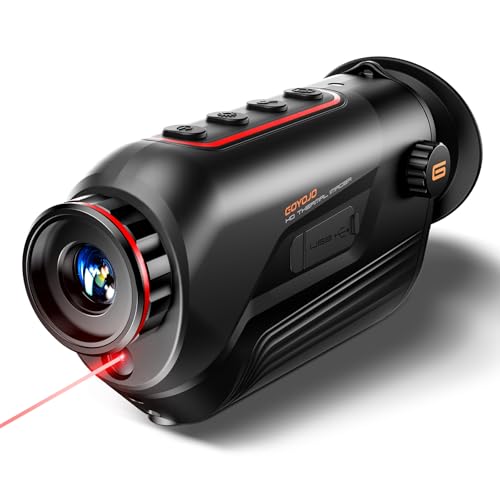
GOYOJO G215 Thermal Imaging Monocular for Hunting, 256x192 (50Hz) Infrared Night Vision Telescope, 15mm Focal Lens Thermal Scopes for Outdoor Night Vision Camera Telescope
As an Amazon Associate we earn from qualifying purchases. Product prices and availability are accurate as of the date/time indicated.

C2 Thermal Imaging Monocular, 256x192 HD (12μm) Handheld Thermal Scope with 8X Zoom, Hot Spot Tracking, Video Recording, Portable Thermal Monocular for Hunting, Wildlife Observation, Outdoor
As an Amazon Associate we earn from qualifying purchases. Product prices and availability are accurate as of the date/time indicated.
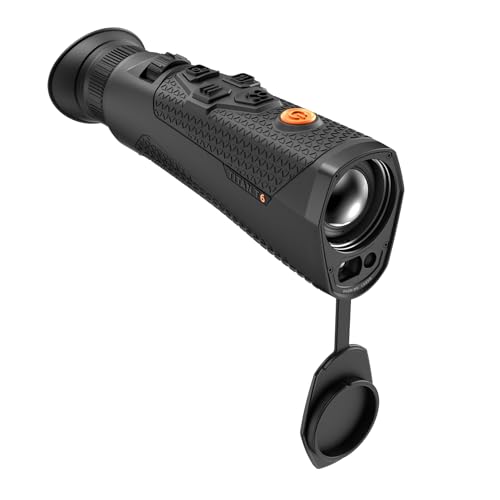
RIX Titan-T6 Thermal Monocular LRF 35mm 640x480 Thermal Imaging Monocular with Laser Rangefinder (50 Hz) 1920×1080 OLED Display Ideal for Night Hunting, Safety Level-Class I, Power Output<1mW


As an Amazon Associate we earn from qualifying purchases. Product prices and availability are accurate as of the date/time indicated.
Prices shown are approximate and for reference only. Prices change often, so please check the current price on Amazon before you buy.
Specifications summarize manufacturers’ published information for current lines; sensor class and features vary by exact model. Ratings are editorial, weighing image quality, focus and calibration usability, build, and value, and are offered as ownership context for readers whose blur proves to be a device limit rather than a fault.
Buying Guide: If the Blur Is the Device, Buy the Next One by These Rules
Step One: Exhaust the Free Fixes and Document the Pattern
Work this guide’s order, diopter against the menu, objective focus at known distances, a manual calibration, a cleaned and equalized lens, settings judged at base magnification in a suitable palette, a fresh warm battery, and a high-contrast test target on a kind night, and write down what each step changed. Most blur dies somewhere in that list, and the list costs an evening. If it survives, your notes, which distances sharpen, whether the menu is crisp, whether the softness is uniform or one-sided, whether it arrived suddenly after a knock or a firmware update, are the difference between a service department’s quick diagnosis and a long one, and between a warranty honored on evidence and a correspondence. Photograph the screen if your device allows capture; a picture of the fault is worth a page of adjectives.
Step Two: Use the Warranty Before the Screwdriver, Always
A thermal monocular is a sealed instrument whose interior contains nothing its owner can adjust and much its owner can ruin, including the nitrogen environment and the sensor’s alignment, so the rule is absolute: no opening, no home repair beyond the maker’s own user procedures, and no third-party tinkering while any warranty breathes. Contact the maker’s support with your documentation, follow their reset and firmware procedures exactly if they direct them, a firmware update cures a genuine class of image faults in modern devices and is the one deep intervention owners are invited to perform, and ship the unit as instructed if it goes. Out of warranty, a maker’s paid service remains the correct address for sensor and lens work. The device cost too much, and sees in the dark besides, to be learned on by its own owner at the kitchen table.
Step Three: When Replacing, Buy Resolution, Focus Feel, and Support
If the verdict is replacement, or the blur was really a 256-class ceiling discovered honestly, buy the next monocular by the lessons of this article: sensor resolution and sensitivity suited to your distances, with identification claimed conservatively; an objective focus ring you have handled, because you will turn it all night, every night; calibration modes that default to automatic; a display and diopter range that suit your eyes; and a maker whose service reputation in your country is a known quantity, because thermal ownership includes service the way a sea boat includes a marina. Handle finalists at dusk if a dealer allows, focus them at near and far, run their calibrations, and choose the one whose image and controls your hands believe. That belief, tested, is the sharpest instrument in this entire guide.
Frequently Asked Questions About Blurry Thermal Monocular Images
Why is my thermal monocular blurry at long distance but sharp up close?
Most often because the objective focus is a manual ring set for the close distance, and thermal monoculars, unlike autofocus cameras, hold exactly the focus you give them: refocus the objective slowly for the distant subject and it should resolve to the limit of the sensor’s resolution and the night’s contrast. If distant subjects never sharpen at any focus while near ones do, work the rest of this guide’s list at distance specifically, calibration, lens film, settings judged at base magnification rather than digital zoom, because digital zoom is the commonest author of distance blur, magnifying a small sensor’s pixels into softness that no focus can cure. Judge the device at its base magnification on a high-contrast distant target, a building against the sky, on a clear, dry night, and if it still will not resolve while the menu is crisp and the near field is sharp, document that pattern and speak to the maker, because you have isolated a symptom with a short list of causes, which is what good troubleshooting is for.
What does the clicking and freezing in my thermal image mean?
It is the calibration, the non-uniformity correction, and it is the sound of the device maintaining its own sharpness: an internal shutter closes for a fraction of a second, the sensor re-zeros against a known reference, and the image resumes, cleaner. It happens at startup, at intervals as temperatures change, and whenever you trigger it manually, and a device that seems to blur progressively over twenty minutes and then click back to clarity is not malfunctioning; it is demonstrating its calibration cycle in public. Your controls over it are the mode settings this guide described, automatic for ordinary use, and a manual trigger whenever the image develops grain, banding, or a ghost that will not leave. If the freezing becomes constant, or the click stops and the image degrades without recovery, that change in the pattern, not the pattern itself, is the service-worthy symptom to report.
Can I clean a thermal monocular lens with regular glass cleaner?
Do not, unless your device’s manual explicitly approves it, because a thermal’s front element and its coatings are not household glass: germanium optics and their anti-reflective coatings can be damaged by ammonia and solvents in common cleaners, and the damage presents as a permanent haze that reads, forever after, as the blur you were trying to fix. The safe method is this guide’s: air first with a blower to remove grit, then a clean microfiber cloth or lens tissue, dry for light films or with proper photographic lens solution for stubborn ones, light pressure, and patience. Keep a dedicated cloth for the thermal, stored clean and sealed, because a cloth that has wiped a dusty truck is a sanding pad with good intentions. When in doubt, the manual’s cleaning page outranks every general habit you own, including the ones in this article, and a maker who answers questions would rather receive yours than your warranty claim.
When should I send a thermal monocular in for service instead of troubleshooting?
Send it when the pattern says hardware: the menu and icons will not sharpen at any diopter setting with a clean, correctly positioned eyepiece; one side or corner of the image is soft while the rest resolves, suggesting alignment; dead pixels multiply or fixed patterns survive every calibration; the image failed suddenly after a drop, an immersion beyond its rating, or a firmware interruption; or the full diagnostic in this guide, performed on a kind night with a fresh battery, leaves a uniform blur on high-contrast targets at base magnification. Send it with your documentation, distances, conditions, and what each step changed, and through the maker’s own process, because thermal service is specialized and the maker’s bench has the targets and the software your kitchen does not. Everything short of those patterns is, in this guide’s experience of the category, a setting, a surface, or a night, and those three are yours to fix, tonight, for free.
Related guides
- Best Rangefinder for Windy Hunting: 6 Best Rangefinder for Windy Hunting Picks in 2026
- Best Premium Spotting Scope Compact Travel: 6 Best Premium Spotting Scope Compact Travel Picks in 2026
- Best Rangefinder Shooting in 2026: 6 Accurate Rangefinders for Hunting and Long-Range Shooting
- Binoculars With Rangefinder vs Separate Rangefinder Hunting in 2026: How to Pick Binoculars With Rangefinder vs Separate Rangefinder for Hunting That Gives Fast Ranging, Clear Views, and Works for Your Hunt
More from Amazon
Programs that pair well with the guide above. Offers and eligibility are set by Amazon and may change.
Free shipping on eligible items, Prime Video and more. Eligible new members can start with a free trial.
Start a Prime free trialAudiobooks and podcasts to listen to on the go. Eligible new members can start with a free trial.
Try Audible freeAd-free music streaming. Eligible new subscribers can start with a free trial.
Try Music Unlimited freeA free business account with business pricing and bulk-buying tools for work, shop or home office.
Create a business accountAs an Amazon Associate we earn from qualifying purchases.

Write Your Review
No reviews yet. Be the first to share your experience!